Tilesets
Every map paints from a tileset. This page explains what the AutoTileset asset holds, how its atlas is laid out, which RPG Maker sheets it accepts and how to create one.
Concept
An AutoTileset is an asset in your project. It holds:
- one atlas texture that contains the pictures of every tile,
- the list of sheets copied into that atlas, called sub-tilesets,
- the collision type of every tile (see Tile Collisions).
A map stores only tile numbers. The pictures and the collisions come from the tileset, so a collision you change in the tileset applies to every map that uses it.
The tileset is built from RPG Maker style sheets. You never slice anything by hand: you drop the sheets into the Tileset Window and it copies them into the atlas at fixed positions.
The atlas and its slots
The atlas is split into square slots of 32 by 32 tiles. With 32 pixel tiles a slot is 1024x1024 pixels, and a 2 by 2 atlas is 2048x2048.
Each slot holds one of two things:
- An autotileset. The five RPG Maker A sheets, A1 to A5, together. This is where water, ground, roofs and walls that join up with their neighbours come from.
- A normal tileset. Four sheets of objects, B, C, D and E, one in each quarter of the slot.
Each of those sheets becomes a sub-tileset, named with a letter. An autotileset slot gives one sub-tileset and a normal slot gives four. The letters are only labels, and the Tileset Window lets you rename them.
A sub-tileset always has 256 tiles. Tile numbers run on across sub-tilesets in slot order: the first sub-tileset has tiles 0 to 255, the second 256 to 511, and so on. To find the sub-tileset of a tile, divide its number by 256.
Warning
Tile numbers depend on the order of the slots. If you empty a slot, every sub-tileset in a later slot gets new numbers, and maps already painted with them show the wrong tiles. Plan the slots before you paint, and add new sheets to free slots at the end.
Sheet types
The sheets follow the RPG Maker VX and VX Ace layout. Sizes are given in tiles; multiply by your tile size for pixels.
| Sheet | Field in the Tileset Window | Size in tiles | Size at 32 px | What it holds |
|---|---|---|---|---|
| A1 | Animated (A1) |
16 x 12 | 512x384 | Animated autotiles: water, lava, waterfalls |
| A2 | Ground (A2) |
16 x 12 | 512x384 | Ground autotiles such as grass, dirt and sand |
| A3 | Building (A3) |
16 x 8 | 512x256 | Building autotiles: roofs and outside walls |
| A4 | Wall (A4) |
16 x 15 | 512x480 | Wall autotiles: wall tops and the faces under them |
| A5 | Normal (A5) |
8 x 16 | 256x512 | Plain ground tiles that do not autotile |
| B to E | Objects (B) to Objects (E) |
16 x 16 | 512x512 | Objects and decorations |
You can leave any of the A sheets out. That part of the slot stays transparent and its tiles paint nothing visible.
Tile order inside a sub-tileset
The palette shows every sub-tileset eight tiles wide, 32 rows tall. In an autotileset the rows are, from the top:
| Rows | Tile numbers | Comes from |
|---|---|---|
| 1 to 2 | 0 to 15 | A1 |
| 3 to 6 | 16 to 47 | A2 |
| 7 to 10 | 48 to 79 | A3 |
| 11 to 16 | 80 to 127 | A4 |
| 17 to 32 | 128 to 255 | A5 |
Each autotile takes one palette cell, even though its source block on the sheet is several tiles big. A B to E sheet is 16 tiles wide, so its palette shows the left half first and the right half below it.
Tile size
A tileset has one tile size, square, set in pixels. The default is 32, which matches RPG Maker VX and VX Ace. RPG Maker MV and MZ sheets use 48 pixel tiles, so a tileset made for them needs Tile Size In Pixels set to 48.
You set the tile size before the atlas exists. Once the atlas is generated the field is gone, because every position in the atlas depends on it. To use sheets of another size, create a new tileset.
The atlas is limited to 4096 pixels per side, so the slot count per side depends on the tile size:
| Tile size | Slot size | Most slots per side |
|---|---|---|
| 16 px | 512x512 | 8 |
| 32 px | 1024x1024 | 4 |
| 48 px | 1536x1536 | 2 |
The tile size also sets the starting Cell Size of a map that uses the tileset. See Maps.
How to use it
Create a tileset
- In the Project window, choose
Assets > Create > RpgMapEditor > AutoTileset. The asset is created asNew AutoTilesetin the selected folder, or inAssetswhen nothing is selected. - Select it. Its inspector asks for the atlas size.
- Set
Horizontal Slots:andVertical Slots:, thenTile Size In Pixels:. - Press
Generate Atlas of 2048x2048(the numbers follow your settings) and save the PNG inside yourAssetsfolder. - Press
Edit Tileset...to open the Tileset Window and fill the slots.
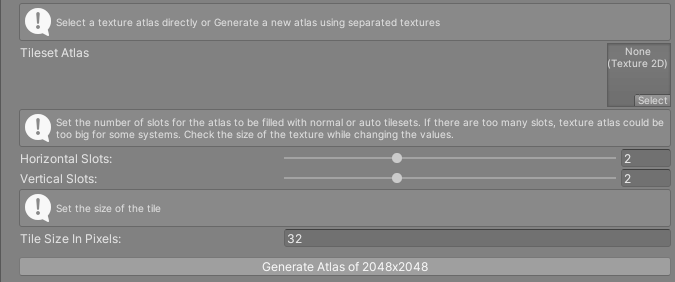
The map inspector has a Create button next to its Tileset field that runs the same step and assigns the result.
Use an atlas you already have
Drag a texture into Tileset Atlas instead of generating one. Its width and height must both be whole multiples of the slot size, or the field stays empty and the Console shows atlas texture has a wrong size.
Assigning an atlas changes its import settings so the tileset can read its pixels: readable, point filtering, no mipmaps, no compression, clamped, no power of two scaling and a maximum size of 4096. If the tileset has no material yet, one is created next to the texture as <texture name> atlas material.mat, using the Sprites/Default shader. The map draws its tiles with that material. You can swap it in the Atlas Material field.
Reference
| Field | What it does |
|---|---|
Tileset Atlas |
The atlas texture. Assigning it rebuilds the tile data. |
Atlas Material |
Material the map draws tiles with. Shown once there is an atlas. |
Edit Tileset... |
Opens the Tileset Window. Shown once there is an atlas. |
Horizontal Slots: / Vertical Slots: |
Atlas size in slots. Shown until there is an atlas. |
Tile Size In Pixels: |
Width and height of one tile. Shown until there is an atlas. |
Generate Atlas of WxH |
Creates an empty atlas PNG of that size and assigns it. |
Where to get sheets
Any tileset drawn for RPG Maker VX or VX Ace fits at 32 pixels, and MV or MZ sheets fit at 48 pixels. Many free and paid ones exist online. Check the licence of each one before you ship a game with it, since some RPG Maker art may only be used inside RPG Maker.
The sample tileset, Samples/Scenes/AutoTileset, is built from the macks tileset in Samples/Gfx/Tilesets/macks. Its credits file, README_Credits.txt, is in the same folder and says how to credit the author.
You can also draw your own sheets. Keep the sizes in the table above: the Tileset Window checks every sheet against them.