Approach & Press
Overview
Approach & Press is the core arrival behavior. Agents seek the target, and the front rank settles at a preferred standoff distance from the target body. The rear mass presses in behind them, with spacing emerging from Personal Space and body blocking rather than pre-assigned slots.
In motion this produces a tide of bodies that closes on the target, compresses against it, and holds there. Agents do not orbit or take turns — they push toward contact and the crowd equilibrium determines who actually reaches the front.
Use this for survivor-like crowds, zombie hordes, and any swarm that should chase and press against a target.
Two additional subgroups
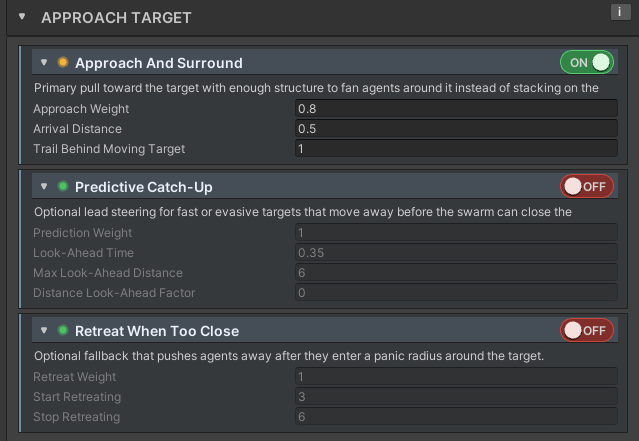
The Approach & Press inspector block has two additional subgroups. The lost-target recovery fields live in Out-of-Sight Fallback under Lost Target Behavior. Combat Standoff, Chase Wander, and Chase Wander Interval are documented on this page.
How it works
The diagram below shows what the pursuit fields on this page do. The target moves with a velocity arrow. Each agent steers toward its standoff seek point — the nearest point on the standoff ring along its own radial to the target. The pull is scaled by Approach Weight and eases off as the agent comes within Arrival Distance of the ring.
Combat Standoff ring is where the front rank settles. Each agent steers toward its standoff seek point — the nearest point on that ring along its own radial to the target — with the pull scaled by Approach Weight and eased as it nears the ring (Arrival Distance). When the target moves, Trail Behind Moving Target biases the seek point toward the target's rear.Inspector at a glance
 1
2
3
4
1
2
3
4
Runtime LOD note
The A&S pass is throttled for agents outside the Full LOD tier. Reduced-tier agents recompute approach steering every Approach And Press Reduced Interval fixed steps; Cheap-tier agents recompute it every Approach And Press Cheap Interval fixed steps. The last computed steering is reapplied on skipped steps so chase pacing stays smooth.
When Use Out-of-Sight Fallback is on, agents farther from the target than Sight Distance switch to lost-target leader following instead of direct approach. With the toggle off (the default), every agent always pursues directly.
Parameter Reference
Simple Parameters
Start here — most projects only need these
-
Approach Weight
Controls how hard agents commit to closing on the target.
Details
- Visible effect — Higher values make agents drive harder toward the target. Lower values let other behaviors (Personal Space, Orbit Style) steer more.
- Gameplay effect — More aggressive chase pressure versus more blending with spacing behaviors.
- Increase when — Agents feel sluggish or separation is overpowering pursuit.
- Decrease when — Agents shove through spacing or orbit behaviors too strongly.
- Pitfalls — A weight of
0is not the same as disabled — the behavior still runs internal bookkeeping. Very high values dominate blended steering before the manager clamps the final result. - Technical effect — Scales the unit steering vector toward the standoff seek point. Also scales the lost-target seek bias, but not the leader-follow weight.
-
Combat Standoff
Sets how close the front rank presses against the target body before easing off.
Details
- Visible effect — Larger values keep the crowd a step outside the target body. Zero lets agents press against the body surface.
- Gameplay effect — For melee archetypes, keep this at or near zero so agents reach attack range. Raise it for bosses or large targets that should not be mobbed into the chest.
- Increase when — Agents clip visually into large targets, or the archetype should keep a visible gap before attacking.
- Decrease when — Melee swarms should make tight contact.
- Pitfalls — This is extra padding beyond the combined body radii, not a raw center distance. The target body radius comes from the
SwarmTargetcomponent, not this profile. - Technical effect — Inner standoff ring =
targetBodyRadius + agentRadius + combatStandoff. The front rank settles where its body surface meets this ring. Attack reach is checked independently by the attack profile.
Advanced Parameters
Power-user knobs — leave at defaults unless you have a reason
Arrival Distance
- Visible effect — Larger values create a softer stop before the standoff position. Smaller values make agents drive closer before easing off.
- Gameplay effect — Larger values feel heavier and less jittery near the target; smaller values feel more direct.
- Increase when — Agents overshoot, vibrate, or constantly micro-correct near the target.
- Decrease when — Agents stop too early or leave too much space before the standoff.
- Pitfalls — Setting this to
0removes arrival easing entirely. Very large values can make the crowd feel soft and over-damped near the target. - Technical effect — Beyond this distance the approach force pulls at full weight. Inside it the force scales down with remaining distance (magnitude ≈
Weight × distance / Arrival Distance), fading to zero as the agent reaches the standoff point. Easing is measured from the standoff surface, not the target center.
Trail Behind Moving Target
- Visible effect — The crowd forms a trailing wake behind a moving player instead of spreading evenly around them.
- Gameplay effect — Creates horde-chase feel and makes kiting more legible to the player.
- Increase when — You want enemies to pour after the player.
- Decrease when — You want interception, flanking, or even all-sides pressure.
- Pitfalls — Only applies when the target has velocity. High values make kiting easier because agents prefer the rear arc. Combining a high value here with high
Look-Ahead Timein Predictive Catch-Up sends conflicting signals. - Technical effect — Adds
trailingDistanceworld units opposite to the target's planar velocity when computing each agent's standoff seek point.
Chase Wander
- Visible effect — The crowd edge looks slightly ragged rather than a clean ring. Agents drift on small, slowly-shifting individual paths while chasing.
- Gameplay effect — Breaks up the mathematical regularity of the approach so large crowds read as organic. The effect is strongest on the outer crowd edge where agents are densest.
- Increase when — A large crowd looks too geometrically clean.
- Decrease when — You want crisp approach geometry, or the drift is pushing front-rank agents out of melee reach.
0disables it entirely. - Pitfalls — High values can push front-rank agents beyond attack reach. This runs at full scale during direct chase and at a reduced scale during lost-target leader-following.
- Technical effect — Adds a planar wander vector scaled by
ChaseWanderWeight * awarenesseach step. During direct chaseawareness = 1; during lost-target followingawareness = followScale. Direction lerps between two consecutive seeded vectors, changing everyChase Wander Intervalseconds.
Chase Wander Interval
- Visible effect — Low values make agents shift direction more often, producing busier-looking drift. High values produce longer, calmer drifts.
- Gameplay effect — Faster intervals feel lively but slightly agitated. Slower intervals feel more natural.
- Increase when — Direction changes look too rapid or noisy.
- Decrease when — Agents drift in one direction too long and visibly pull away from the crowd.
- Pitfalls — Has no visible effect when
Chase Wanderis0. The runtime enforces a minimum of0.05seconds regardless of the inspector value. - Technical effect — Sets the time slice length for direction interpolation:
floor(simulationTime / interval)selects the pair of seeded directions to lerp between. Each agent uses a unique seed, so direction changes are not synchronized across the crowd.
Practical Usage Guidance
Use this as the main arrival driver for survivor-like games, zombie hordes, and melee swarms. It pairs well with Personal Space for readable dense crowds. Agents queue automatically against the front rank — there is no separate queue behavior to enable.
Predictive Catch-Up can be added for faster units. High trailing distance paired with high look-ahead sends conflicting signals, so keep both in check if combining them.
Avoid relying on this alone for strafing enemies or enemies that need a strict minimum distance. Pair lightly with Orbit Style for those, or lower the approach weight to give orbit room to steer.
Gameplay Interpretation
Strong approach weight and low combat standoff make enemies feel aggressive — the crowd presses hard against the target body. High trailing distance makes the horde feel like a chase wave, which tends to make kiting easier but reads more clearly to the player.
Adding small Chase Wander to a large crowd makes the approach edge look like a crowd rather than a formation. The effect is mostly invisible on small groups but clearly improves the read on 50+ agents.
Quickstart — tune in this order
- Enable the behavior and set
Approach Weightuntil pursuit pressure feels right against the movement profile. - Set
Combat Standoff— usually0for tight melee; raise it only if agents need a gap before the target body. - Adjust
Arrival Distanceonly if agents overshoot or stop too early. - Add
Trail Behind Moving Targetfor horde-chase feel; keep it low for flanking. - Add
Chase Wanderif a large crowd edge looks too geometrically clean; adjustChase Wander Intervalto taste. - Enable Out-of-Sight Fallback only if the game needs limited awareness or recovery behavior.