Swarm Movement Profile
Controls how fast agents move and how they orient. Create via right-click → Create → Massive Swarm System → Agents → Movement Profile.
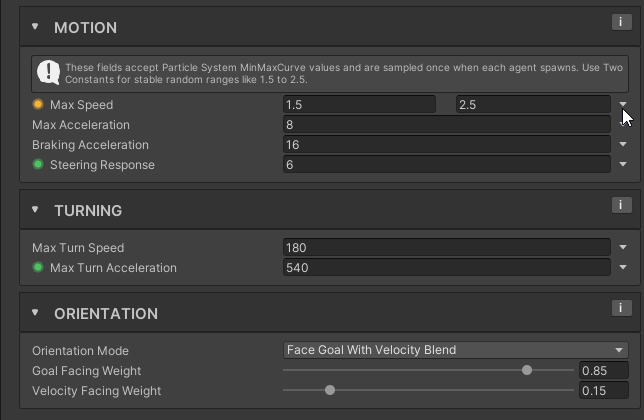
The six speed and turning fields can differ per agent. Each agent reads its own value when it spawns and keeps it, so a crowd built from one profile still varies, and reading it costs nothing per frame. In the editor, changing the profile during Play re-reads every live agent from its same roll, so tuning shows at once. The three Orientation fields are ordinary settings and are shared by every agent using the profile.
Tip
Give Max Speed a Range rather than a Fixed value to get variation across a large swarm. Even a narrow one takes the mechanical look off a crowd, and it costs nothing at runtime.
Per-agent values
Each of the six fields has a mode picker on its right:
| Mode | What each agent gets |
|---|---|
| Fixed | The same value as every other agent. |
| Range | A value between the two numbers. The first can be the larger one, which hands the high values to the low rolls. |
| Curve | The curve read at the agent's roll: X is the roll, 0 to 1, and Y is the value. Its shape decides how many agents are slow and how many are fast, so a curve that stays low until 0.78 and then jumps makes 78 % walkers and 22 % runners. |
| Band | A point between two curves, both read at the agent's roll. Agents with the same roll still differ a little. |
For Curve and Band, a line under the field says what agents actually get, for example agents get 0.75 to 2.2 units/s.
The agent roll
Every agent rolls one number between 0 and 1 when it spawns and keeps it for its life. Every field on Shared, which is the default, reads that same number. An agent that rolled low gets the low end of Max Speed and the low end of Max Turn Speed too, so the slow agents are also the slow turners instead of shamblers that whip around at full speed.
The link icon beside the mode picker shows which roll a field reads. Linked is Shared. Click it to break the link and the field rolls a number of its own, unrelated to the others, which is how every field behaved before 1.1. A Fixed field has nothing to roll, so its icon is greyed out.
A Band on Shared reads the shared roll along its curves but still picks its own point between them, which gives you a link with some noise in it.
Your own scripts can read the same roll with SwarmManager.TryGetAgentRoll(handle, out float roll), for example to give the fast agents less health. The Swarm Debug window shows it as Agent Roll.
Motion
| Field | What it does |
|---|---|
| Max Speed | Maximum linear speed. Default 4. |
| Max Acceleration | How quickly agents accelerate toward desired speed. Default 20. |
| Braking Acceleration | How quickly agents slow down when steering drops to zero. Default 28. |
| Steering Response | How quickly agents follow steering direction changes. Higher is snappier; lower is smoother. 0 means immediate. Default 10. |
Turning
| Field | What it does |
|---|---|
| Max Turn Speed | Ceiling on yaw rotation speed in degrees per second. Default 720. A small heading error never reaches it, because the braking limit below caps the turn well under it. |
| Max Turn Acceleration | How fast yaw rotation speed itself may change, in degrees per second squared. Default 2160. Usually the knob that decides how a swarm reads, because turning is acceleration limited rather than a flat rate. |
Orientation
Movement still uses the full blended steering, so an agent facing one way can be sliding another.
Facing is not only cosmetic
An agent's forward direction is read by four simulation paths: the Perception sight cone that decides what it notices, the pushback direction an attack applies to whatever it hits, the fallback direction obstacle depenetration uses when the query returns no depth and the agent has no remembered safe side and almost no velocity, and the push direction body blocking uses when two agents sit exactly on the same spot. Changing the orientation mode or these weights therefore changes who gets detected and which way a hit shoves the player, not just how the model is posed.
Orientation Mode picks the rule. Three options ship:
| Mode | Facing |
|---|---|
| Face Goal With Velocity Blend | The default. Mixes goal direction and travel direction using the two weights below. |
| Face Goal | Goal direction only. The weights are ignored. |
| Face Velocity | Travel direction only. The weights are ignored, and the goal direction is never computed, which makes this the cheapest of the three. |
The goal direction is whatever the agent is currently trying to do, resolved in priority order: fleeing a target it is retreating from, following the surface flow field around an obstacle, intercepting a moving target, closing on a target with Approach & Press, or facing the target it is orbiting. Travel direction is the agent's own planar velocity, which includes local corrections like Personal Space pushing it sideways.
The two weights apply to the blend mode and nothing else. The inspector greys them out under the other two modes and says so.
| Field | What it does |
|---|---|
| Goal Facing Weight | How strongly goal direction pulls facing. 0 to 1, default 0.8. |
| Velocity Facing Weight | How strongly travel direction pulls facing. 0 to 1, default 0.2. Keep it low when you do not want separation shoving to twist the model. |
Goal bias is the point of the default split. At 0.8 against 0.2 an agent keeps looking at what it is chasing while Personal Space nudges it around its neighbors, instead of twitching toward every avoidance correction.
A swinging agent ignores all of this. While its swing is in windup or recovery, it turns toward the target it is attacking, or toward the door or barricade in reach when it is attacking an obstacle, in every Orientation Mode and at every importance tier. The turn rate is Max Turn Speed times the Attack Profile's Swing Turn Speed Multiplier. An agent that is searching for a target it cannot see keeps its normal facing, unless it is swinging at an obstacle.
Turning is acceleration limited, not a flat rate
An agent does not snap to Max Turn Speed and hold it. Its angular speed ramps toward a target at Max Turn Acceleration per second, and that target is the lower of Max Turn Speed and a braking limit derived from how much heading error is left, so the head slows as it arrives instead of overshooting and correcting back. Two consequences worth knowing while tuning. A small correction never gets near Max Turn Speed, because the braking limit dominates over a short arc. And a full about-face spends its first few steps building up speed, so raising Max Turn Speed alone does little for it while raising Max Turn Acceleration is felt immediately.
Read per agent, Max Acceleration, Braking Acceleration and both turn fields floor at 0.01, and Max Speed and Steering Response floor at 0.
Both weights at zero is not a way to freeze facing
Under Face Goal With Velocity Blend, setting both weights to 0 makes the blend a zero vector, and the resolver falls back to the goal direction. An agent with a goal then faces that goal exactly as if Goal Facing Weight were 1, which is the opposite of what the combination looks like it should do. Outside the Full importance tier there is no goal resolved, so it falls back to the travel direction instead. An agent holds its current forward only when it has neither. To stop agents turning toward a goal, use Face Velocity. The inspector raises a warning when it sees both weights at zero.
Goal facing is a Full-tier feature
The goal direction is only resolved for agents in the Full importance tier. Outside it, Face Goal With Velocity Blend falls back to facing travel direction, and Face Goal holds the facing the agent already had. That is deliberate: the far crowd is where the saving matters and where nobody is looking closely. If you need goal facing to hold further out, raise the LOD distances or Full Quality Agent Cap in Swarm Settings, not anything on this page.
Related
- Swarm Agent Archetype: how movement profiles are assigned per enemy type.
- Behaviors: steering profiles run on top of movement settings.
- Importance LOD: which agents are in the Full tier.