Project Settings
Open via Edit → Project Settings → Massive Swarm System.
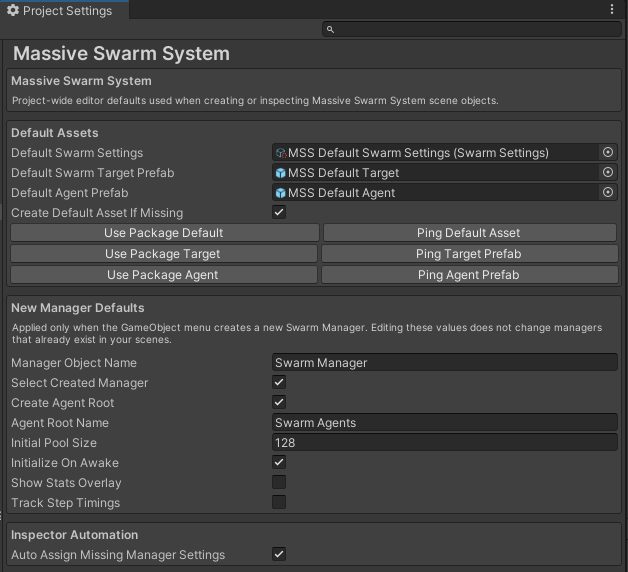
Sets project-wide editor defaults for creating Massive Swarm System scene objects. Editing a value here never reaches back into a manager, target, or spawner that already exists, with one exception: Auto Assign Missing Manager Settings under Inspector Automation fills the settings slot of any existing manager the moment you select it.
Default Assets
- Default Swarm Settings: the
SwarmSettingsasset assigned to newSwarmManagercomponents when you use the Scene View overlay or the GameObject → Massive Swarm System → Swarm Manager menu. - Default Swarm Target Prefab: the prefab instantiated when you use Swarm Target from the overlay or the menu. Out of the box this points to the bundled
MSS Default Targetprefab, which includes a movement controller so you can test the swarm before connecting a player. If you clear it, the menu falls back to creating a simple capsule-and-cylinder target instead. Either way the tool guarantees aSwarmTargetcomponent on the created object. - Default Agent Prefab: the prefab assigned to a new
SwarmVisualManager's Fallback Agent Prefab slot. Out of the box this points to the bundledMSS Default Agentprefab, so a brand-new swarm can spawn visible agents before you author your own art. It is also what two one-click buttons reach for later: Use MSS Default Agent, which appears on anySwarmVisualManagerwhose fallback slot is empty, and Use built-in default agent in the Archetype Wizard's prefab field. Clear it if you always supply per-archetype prefabs and do not want a fallback. - Create Default Asset If Missing: when the Default Swarm Settings slot is empty and a new manager needs one, creates
Assets/MSS/Settings/MSS Swarm Settingsas a copy of the bundled reference asset and assigns it. The asset lives outside the package folder, so a package update never overwrites it.
The Reset button next to each prefab restores the bundled package prefab. On Default Swarm Settings it points the slot back at your own Assets/MSS/Settings/MSS Swarm Settings asset, creating it from the bundled reference if it is not there.
New Manager Defaults
These values are stamped onto a SwarmManager at creation time only. Changing them here does not modify managers that already exist.
- Manager Object Name: the name given to the manager's GameObject.
- Select Created Manager: selects the new manager in the Hierarchy after it is created.
- Create Agent Root: creates a sibling
Transformto hold pooled agent visuals and assigns it to the new manager'sSwarmVisualManager. - Agent Root Name: the name given to that agent-root GameObject.
- Initial Pool Size: the starting pool size assigned to
SwarmVisualManageron a newly created manager. - Initialize On Awake: sets the Initialize On Awake toggle on new managers.
- Show Stats Overlay: sets the Show Stats Overlay toggle on new managers.
- Track Step Timings: sets the Track Step Timings toggle on new managers.
Inspector Automation
- Auto Assign Missing Manager Settings: when a
SwarmManagerhas no settings asset in the inspector, the editor assigns the project default automatically. This is the one setting on the page that touches objects already in your scenes: selecting an unconfigured manager fills its slot and marks the scene dirty. It does not run in Play mode.
Updates
- Installed Version, Latest Version, Last Checked: read-only. What this project has, what the Unity Asset Store last reported, and when it was asked, in this computer's local time.
- Check For Updates: when on, the editor asks the Unity Asset Store for the latest version number, at most once a day. Nothing about you or your project is sent. The switch belongs to this project on this computer and is not shared through version control.
- Check Now: asks immediately. Disabled while Check For Updates is off.
- View Update: opens the Welcome window on the update card when a newer version is available.
- Stop Skipping: shows the notice again for a version you chose to skip.
Sections the samples add
Import the samples and three more sections appear below Updates, each pointing the matching Scene View overlay button at the prefab or asset it should use. Every field has a Reset button back to the bundled one.
| Section | Field |
|---|---|
| Combat Helpers (StarterKit) | Default Health Bar Prefab, used by Health Bar |
| Swarm Combat (StarterKit) | Default Combat Archetype, used by Enable Combat (Killable Agents) |
| Weapons (Full Demo) | Default Melee Weapon Prefab and Default Projectile Weapon Prefab, used by the two Weapons buttons |
Delete a sample and its section disappears with it. Point a field at your own prefab when you want the overlay buttons to wire up your art instead of ours.
Creating a custom settings asset
Both routes start from the same warning box, the one that tells you the asset you are looking at is the shared project default. Select a manager still pointed at that asset and its inspector offers Create Custom Swarm Settings. Select the asset itself and the SwarmSettings inspector offers Clone to a New Swarm Settings Asset. Either opens a save dialog so you can name and place the new asset, and the new asset is a copy of the current one, which is the right way to build per-scene tuning variants without editing the shared default.
Once a manager points at an asset of its own, neither button is drawn any more. Neither one appears while several objects are selected either, since the save dialog can only produce one asset.
When to use it
- Set a project-wide default
SwarmSettingsso every new scene starts with the right capacity and grounding masks for your project. - Swap the default target prefab when your project has a common player prefab that already includes a
SwarmTargetcomponent. - Clear Default Agent Prefab once your archetypes all carry their own prefabs and you no longer need the placeholder.
Related
- Swarm Settings: the asset configured here.
- Swarm Manager: receives the default at creation time.