Swarm Agent Archetype
Defines one enemy type. An archetype binds together the visual prefab, the agent's physical radius and push resistance, and the behavior, movement, attack and perception profiles that govern how this enemy moves, fights and notices targets. Spawners reference archetypes, so the same spawner shape can serve different enemy types.
Archetype Wizard
Use the wizard for your first archetype
The wizard creates an archetype plus fully wired Behavior, Movement, and optional Attack profiles in one step. It is the fastest way to get a new enemy type into your scene.
It leaves Perception Profile empty, so the archetype starts out chasing any registered target the way every archetype did before perception existed. Assign a profile afterward if you want this enemy type to chase only what it has noticed.
Open it from either menu path. Both open the same window, which docks with the tab title New Swarm Archetype:
- Tools → Massive Swarm System → New Archetype...
- Right-click in the Project window → Create → Massive Swarm System → Agents → Agent Archetype (Wizard)... (opens with the selected folder pre-filled, and when the selected asset is a prefab, with that prefab assigned and the archetype named after it)
The wizard walks through four steps:
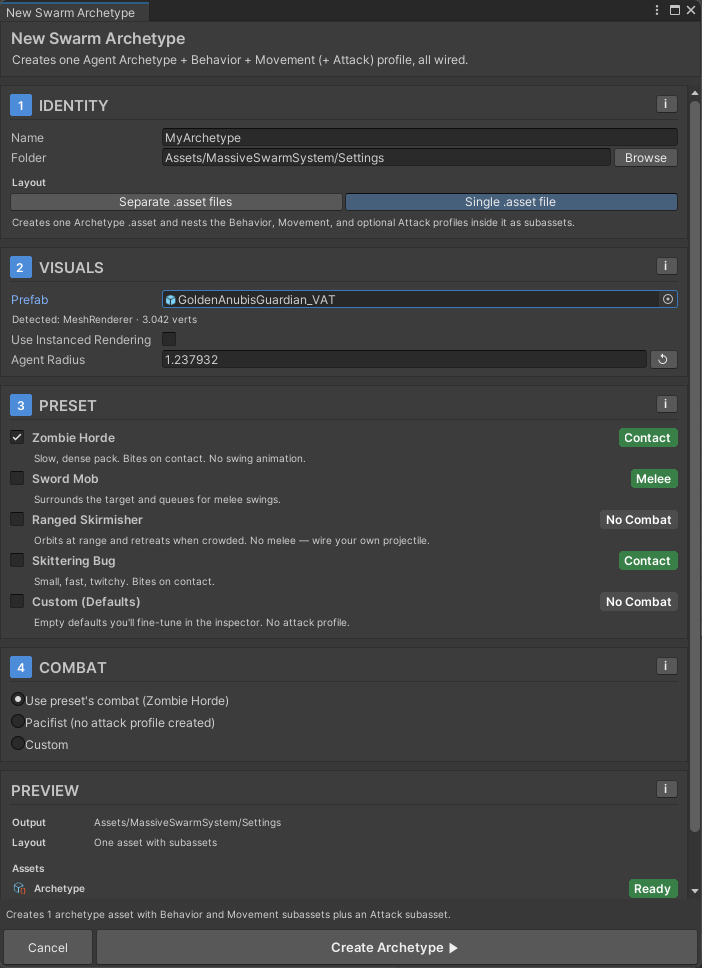
- Identity: name and output folder. Choose Single .asset file (the default: all profiles nested as sub-assets inside the archetype, so one file holds the whole enemy type) or Separate .asset files (a new folder with one file per profile, easier to diff and to share a profile between archetypes by hand). The wizard remembers your last layout choice and your last valid output folder between sessions, so the second archetype you create starts where the first one left off rather than back at the defaults.
- Visuals: assign your prefab. The wizard reads prefab bounds to suggest an agent radius automatically. If the prefab contains a
SkinnedMeshRenderer, a link to the VAT Baker is shown. - Preset: pick a starting point from the built-in presets (described below). Each preset ships independent profile copies, so editing one archetype's profiles never affects another.
- Combat: use the preset's attack profile, create none (Pacifist), or configure a Custom profile with Swing and/or Contact enabled.
Click Create Archetype to write all assets at once. On success the wizard pings the new archetype in the Project window and offers shortcuts to the inspector.
Built-in presets
| Preset | Movement feel | Combat |
|---|---|---|
| Zombie Horde | Slow, dense. Lumbers toward the target in a tight pack. | Contact (bites on touch, no swing animation) |
| Sword Mob | Medium speed. Surrounds the target and queues for melee strikes. | Swing (melee with windup, recovery, and animation) |
| Ranged Skirmisher | Fast. Orbits at range, retreats when crowded. | None; wire your own projectile logic |
| Skittering Bug | Very fast and twitchy. Small radius. | Contact (rapid light bites on touch) |
| Custom (Defaults) | Medium speed, balanced acceleration. | None; tune everything in the inspector |
The numbers behind those descriptions, for when you want to compare rather than read:
| Preset | Max Speed | Agent Radius | Push Resistance | Orientation Mode |
|---|---|---|---|---|
| Zombie Horde | 1.2 to 2 (Range) |
0.5 |
1.5 |
Face Goal With Velocity Blend |
| Sword Mob | 4 |
0.5 |
1 |
Face Goal With Velocity Blend |
| Ranged Skirmisher | 5 |
0.5 |
1 |
Face Goal |
| Skittering Bug | 7 |
0.3 |
0.5 |
Face Velocity |
| Custom (Defaults) | 4 |
0.5 |
1 |
Face Goal With Velocity Blend |
Only Zombie Horde varies per agent: its Max Speed is a Range, so the pack does not move in lockstep. The other presets use one fixed value.
Push Resistance is what makes the zombie feel heavy and the bug feel flimsy: at 1.5 the zombie shrugs off shoves that send the bug at 0.5 flying.
Restoring the built-in presets
The wizard only creates preset assets that are missing. It never overwrites edits you've made to them. If you want to revert all five built-in presets back to their shipped values, run Tools → Massive Swarm System → Restore Default Wizard Presets. A confirmation dialog explains what will change. Archetypes you already created from those presets are not affected.
When to use the wizard vs. creating assets manually
Use the wizard when you are creating a new archetype from scratch. Use the manual Create → Agent Archetype flow (documented in the field reference below) when you want to duplicate or variant an existing archetype and only change one or two fields. In that case duplicating the existing .asset files is faster.
Field reference
Create a bare archetype via right-click → Create → Massive Swarm System → Agents → Agent Archetype.
| Field | What it does |
|---|---|
| Agent Prefab | The visual GameObject instantiated into the pool. If left empty, the SwarmVisualManager's Fallback Agent Prefab is used instead. A manager created from Tools → Massive Swarm System starts with that slot pointing at the bundled MSS Default Agent, so agents are visible while you work on your own art. A SwarmVisualManager you added by hand starts with that slot empty instead, and its inspector offers a Use MSS Default Agent button to fill it in one click. |
| Agent Radius | Collision and separation radius for this archetype. Default 0.5. Values below 0.01 are clamped up. |
| Push Resistance | How hard this archetype is to shove or knock back. Higher values resist pushes from other agents and combat pushback. Default 1. Values below 0.01 are clamped up. |
| Behavior Profile | Which SwarmBehaviorProfile controls steering for agents of this type. |
| Movement Profile | Which SwarmMovementProfile controls speed and turn rate. |
| Attack Profile | Optional SwarmAttackProfile that gives this archetype swing and/or contact attacks. Leave empty for a pacifist enemy: no attacks, no per-agent combat overhead. See Attack Profile. |
| Perception Profile | Optional SwarmPerceptionProfile that gates targeting behind sight and memory. Leave it empty and agents chase whichever registered target is the best match, which is how every archetype behaved before perception existed. Assign one and agents chase only targets they've noticed, adding a per-agent sense pass rated Medium performance impact that often pays for itself, since agents that have noticed nothing can go dormant. See Perception. |
A misconfigured profile leaves agents idle
Turn Sight off on the assigned profile, or leave Range in its Sight section at 0, and agents with that profile notice nothing and stand still. Both cases raise a warning right in the Perception section of the archetype inspector.
Editing a profile without leaving the archetype
Under the Behavior Profile and Movement Profile slots the inspector offers Edit Behavior Profile In Place and Edit Movement Profile In Place. Either one folds the profile's full inspector into the archetype, so you can tune steering while looking at the archetype that uses it instead of selecting two assets in turn. Stop Editing In Place folds it back up.
You are editing a shared asset
A profile is its own asset, and more than one archetype can point at it. Editing it here changes it for all of them. The inspector names the asset in a warning above the button for exactly this reason. If you only meant to change this one enemy type, duplicate the profile first and assign the copy. Archetypes created by the wizard each get their own profile copies, so this bites hardest on archetypes you wired by hand.
With several archetypes selected at once, the inline editor refuses to open unless they all point at the same profile.
Readouts and warnings in the inspector
The archetype inspector reads your prefab and your profiles together, which no single profile can do, so it reports what the combination will do. The messages below appear only when they apply. Each one is quoted as the editor prints it, with N standing in for a number.
Visuals
The Agent Prefab has an Animator but no Swarm Agent Animation component. Nothing writes the agent's speed to the Animator, and its root motion and culling mode stay as the prefab has them.The button is Add Swarm Agent Animation. It does not appear when the prefab has a VAT Animator. On an imported model the message ends withThis prefab is an imported model, so make a prefab from it and add the component there.and has no button.The Agent Prefab is on layer N (NAME), which is inside this scene's Surface Flow or Obstacle layer masks on the SwarmManager.The message goes on to say the agents will read as level geometry. It has no button. Move the prefab to a layer outside those masks.
Movement Profile
When the prefab has a VAT Animator, a line under the profile slot says how the agent's walk and run will play. For a single speed it reads At its Max Speed of N units/second this agent plays the walk at Nx. or ...the run at Nx. For a Range or Curve it reads At their Max Speed, N to N units/second, these agents play a walk and run blend that is N to N % run.
Two cases turn the line into a box. A warning adds The walk clip is matched to N units/second and is never played under Nx (Min Moving Playback Speed on the prefab's VAT Animator), so the slowest agents' feet slide. An info box adds The run clip is matched to N units/second, so it plays that much faster than it was animated. when the fastest agents play the run clip well above the speed it was animated at.
Combat
Assigned profile has neither Swing nor Contact enabled, so no damage will be applied.Buttons: Enable Swing and Enable Contact.Swing Reach (N units) is shorter than Combat Standoff (N units) on NAME. The front rank stops N units out from the target and never gets close enough to attack.It names Contact Reach instead when that is the short one, and appears when the Behavior Profile has Approach & Press on. Buttons: Set Reach to N (just past the standoff) and Select Behavior Profile.- When Swing and Swing Play Animation are on and the prefab's VAT asset has an attack clip, a line reports the timing, for example
Attack clip plays at Nx: blow at N s with the damage, clip ends at N s, agent held for N s.With a Range on Swing Windup or Swing Recovery it shows spans instead. - If the clip has no Hit Time, the box says
The attack clip on NAME has no Hit Time, so it plays at its own speed and its blow shows wherever the clip puts it, not when the damage lands.Buttons: Detect Hit Time and Select VAT Asset. - When the clip would have to play faster or slower than it is allowed to, or the agent moves off before the clip ends (
If it moves off as soon as it is free, the last N s of the clip is cut.), the box offers Set Windup to N or Set Recovery to N. These two appear only on a Fixed field. On a Range the message tells you to narrow it on the Attack Profile instead.
Fix buttons write to shared assets
Enable Swing, Enable Contact, Set Reach to N, Set Windup to N and Set Recovery to N change the Attack Profile asset, so every archetype using it changes too. Detect Hit Time writes to the VAT asset, and Add Swarm Agent Animation to the prefab asset. Undo reverts each one.
Writing your own wizard presets
The five built-in presets are not special. Each one is a SwarmArchetypePreset asset, and the wizard finds every preset in the project and lists them sorted by Sort Order. So if your game has four recurring enemy shapes, you can make them one-click options for the rest of the team.
Create one with right-click → Create → Massive Swarm System → Wizard → Archetype Preset.
| Field | What it does |
|---|---|
| Display Name | The name in the wizard's list. New presets start pre-filled with Untitled Preset rather than blank, and fall back to the asset's own filename only if you clear the field entirely |
| Summary | One line shown under the name. This is where you say what the preset is for. A pill beside the name shows the preset's combat: No Combat, Melee, Contact or Melee + Contact |
| Sort Order | Lower numbers list first. Default 100. The five built-in presets ship 10, 20, 30, 40, and 99, so a preset left at the default already sorts below all of them; go under 10 to put yours on top |
| Default Radius | Agent radius the wizard uses when you click this preset's row. It applies only while no prefab is assigned and you have not typed a radius yourself. Otherwise the radius suggested from the prefab bounds, or your own, wins. Default 0.5 |
| Default Push Resistance | Push resistance written into the new archetype. Default 1 |
| Behavior Seed | The behavior profile to clone. Required |
| Movement Seed | The movement profile to clone. Required |
| Attack Seed | Optional attack profile to clone. Leave it empty for a pacifist preset, and no attack profile is created at all |
The three seed slots are cloned, not referenced, so every archetype the wizard creates from your preset gets its own independent profiles. Tuning one enemy later never reaches back into the preset or into anything else built from it. The quickest way to author one is to build an archetype you like by hand, then point a new preset at its three profiles.
Mixing archetypes in a single swarm
Multiple archetypes work in one scene. A shape spawner carries one archetype in its Spawn Profile, so mixing inside a single encounter is the Swarm Spawner Director's job: its Composition list takes a weighted set of archetypes and rolls one per spawn, which is how you get runners, tanks and harassers arriving from the same spawner. Without a director, mix by placing one spawner per enemy type.
Related
- Behaviors: what the Behavior Profile controls.
- Movement Profile: the speed/turn settings the archetype links to.
- Perception: what the Perception Profile controls.
- Spawners: how archetypes are spawned into the scene.