Doors and Barricades
The baked Surface Flow Field never changes at runtime. A door that opens, a barricade that falls, or a bin that gets shoved down the street all need the route to change anyway, without a rebake trip back to the editor. Three components do that: Swarm Flow Modifier marks a box of cells as closed, costly to cross, or both; Swarm Breakable lets the swarm fight its way through with health, crowd pressure and noise; Swarm Pushable lets the swarm, and the player, shove a prop out of the way.
All three run live. Moving, opening, breaking or repairing one restamps its cells on the next simulation step. Nothing here touches the baked map itself, so there is no rebake and no editor round trip.
Needs Surface Flow Field Navigation
These components only edit the surface flow field, so without Surface Flow Field Navigation enabled on the SwarmManager, a Swarm Flow Modifier neither stops agents nor changes their route. The modifier's own inspector catches this and offers an Enable Surface Flow Field button right there.
Stopping agents also needs Surface Flow Enforce Cell Boundaries in Swarm Settings, which is on by default. With it off a closed box stops nobody, so nothing presses it, hits it or pushes it, and only its route change still works. The Swarm Flow Modifier and Swarm Breakable inspectors warn about both settings and carry the button that turns each one on.
Swarm Flow Modifier
This is the one every door, barricade, fence and pushed prop needs. Add it alone for a toggleable obstacle; pair it with a Swarm Breakable or a Swarm Pushable for the rest.
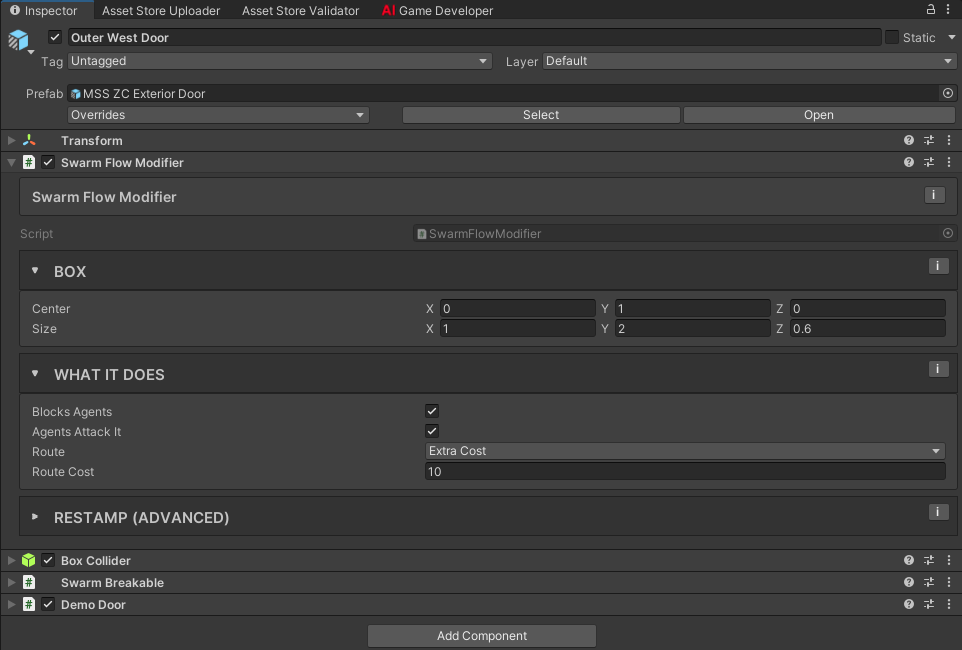
- Center and Size: the box that marks which cells this object covers, in its own local space. Only the footprint seen from above decides which cells it reaches, within a height band around the box's own vertical extent, so a door on an upper floor does not seal the cell directly under it on the ground floor. For a door, size the box to the doorway opening, not the door leaf, so every cell the opening covers closes while the leaf is shut. A box thinner than one cell still closes the single cell its center sits in, so a hairline box never silently does nothing.
- Blocks Agents: on, agents cannot step into the covered cells at all. An agent pressed against a closed cell attacks the object (if Agents Attack It is on and something here can take damage) or pushes it (if it has a Swarm Pushable). Off, the box only changes the route cost and agents walk straight through.
- Route: how the baked route treats these cells. Free ignores the box entirely, which is what you want on a prop the horde should shove out of its way rather than detour around. Extra Cost adds Route Cost world units to any route that crosses the box, so the crowd only comes through when the way around costs more than that. Blocked treats the box as a permanent wall the route always goes around, whatever it costs.
- Route Cost: extra route length, in world units, that one crossing of the box costs, however many cells deep the box is. Only shown for Extra Cost. A Swarm Breakable lowers it once the object reaches Damaged; see Breakable Obstacles. A closed door with a high cost also hides what is behind it, covered below. The cost has a ceiling: each cell a crossing enters adds at most 1024 cells of detour, which is 512 units for a box one cell deep at a Cell Size of 0.5. A higher value changes nothing, and the inspector warns when yours is past it. For a box the route should never cross, use Blocked.
- Agents Attack It: whether agents blocked by this object hit it with their normal attack, when something here (or on a parent) can take damage. Only an agent that is actually going somewhere does this: chasing a target it sees, walking to the spot it last saw one, or heading toward a noise it heard. Turn it off and crowd pressure stops too, so the queue behind a door stops wearing it down. See Breakable Obstacles for exactly how the crowd decides to press and hit.
- Move Threshold and Rotation Threshold, in the collapsed Restamp (advanced) group: how far the object has to move or turn, in world units and degrees, before its cells restamp. Raise Move Threshold for an object that jitters in place instead of restamping every step for nothing.
Opening and shutting. IsOpen is a runtime switch your own door script sets, not an inspector field: true removes the box's closure and its route cost while it stays registered, so flipping it skips the unregister and re-register that disabling the component does. Every restamp redoes the whole layer, an IsOpen flip included, so the saving is that registration work. It is never saved, so every object starts shut. Disabling the component, or the GameObject, still works for an obstacle that is gone for good, but it unregisters the modifier entirely and restamps the whole layer, so prefer IsOpen for anything that opens and shuts more than once. The swarm never decides to open or shut anything on its own; see Breakable Obstacles for the patterns a door script builds on top of it.
Changing Center, Size, Blocks Agents, Route or Route Cost from script restamps automatically on the next step. ForceUpdate() restamps even when nothing changed, for the rare case where something around the box changed instead. If you add your own IDamageable or ITargetable after the modifier already enabled, call RefreshDamageable() so it picks it up. Call RefreshColliders() after adding or removing a collider underneath it while it stays enabled.
How the Crowd Decides: Go Around or Break Through
Nobody scripts this choice. It falls out of comparing two route lengths at bake time, the same way the pathfinder already compares any two routes.
Say a door sits 6 units from the crowd's side of a wall, with Route Cost at 10. Crossing it costs the pathfinder 6 + 10 = 16 units. A second entrance 14 units away is still cheaper, so the whole crowd ignores the door and files through that entrance instead. Move that second entrance out to 22 units, and the door's 16 is now the shorter route, so the crowd stops going around and starts battering the door down.
Add a Swarm Breakable and the door gets cheaper the moment it crosses into Damaged. With the default Damaged Route Cost Scale of 0.5, the cost halves from 10 to 5, so crossing it now costs 6 + 5 = 11, which beats both entrances above, including the one that used to be the shorter way around. The agents who were calmly filing through the 14-unit entrance redirect onto the door the moment it gives way, so the whole crowd piles onto the first breach instead of splitting its attention. That change happens once, at the state crossing, not continuously as health falls, so a door under attack restamps and rebakes a couple of times in its whole life instead of on every hit.
Hiding What's Behind It
A closed door does not just block movement. Any archetype whose Sight: Occlusion is set to Navigation Path decides whether it has seen a target by comparing the walkable route against the straight-line distance, within Occlusion Detour Tolerance. A high Route Cost on a closed door reads as exactly that kind of detour, so it keeps a target on the other side unseen until the door opens or breaks. A cheap fence with a low Route Cost barely moves that comparison, so it hides nothing. Since a Swarm Breakable halves its cost once Damaged by default, a door that has already taken a beating hides less than a fresh one.
Blocked can make a wall see-through
Route set to Blocked gives the pathfinder no way through the box. If that box was the only way in, agents on the far side have no route to measure, and a route that cannot be measured reads as "not blocked" to Occlusion, whether it is gating Sight or Alert Spread. While another way round exists, the detour still hides the target. If you want a destructible wall to hide what is behind it in both cases, use Extra Cost with a high Route Cost instead of Blocked. Doors ship on Extra Cost for exactly this reason.
Swarm Breakable
Health for anything the swarm should be able to fight through: strikes from whoever can reach it, and the weight of everyone else queued behind. It requires a Swarm Flow Modifier on the same object and implements IDamageable directly, so it works with no other combat setup. This list is the fields; see Breakable Obstacles for how the two damage channels, the noise it makes and what is left when it breaks all fit together.
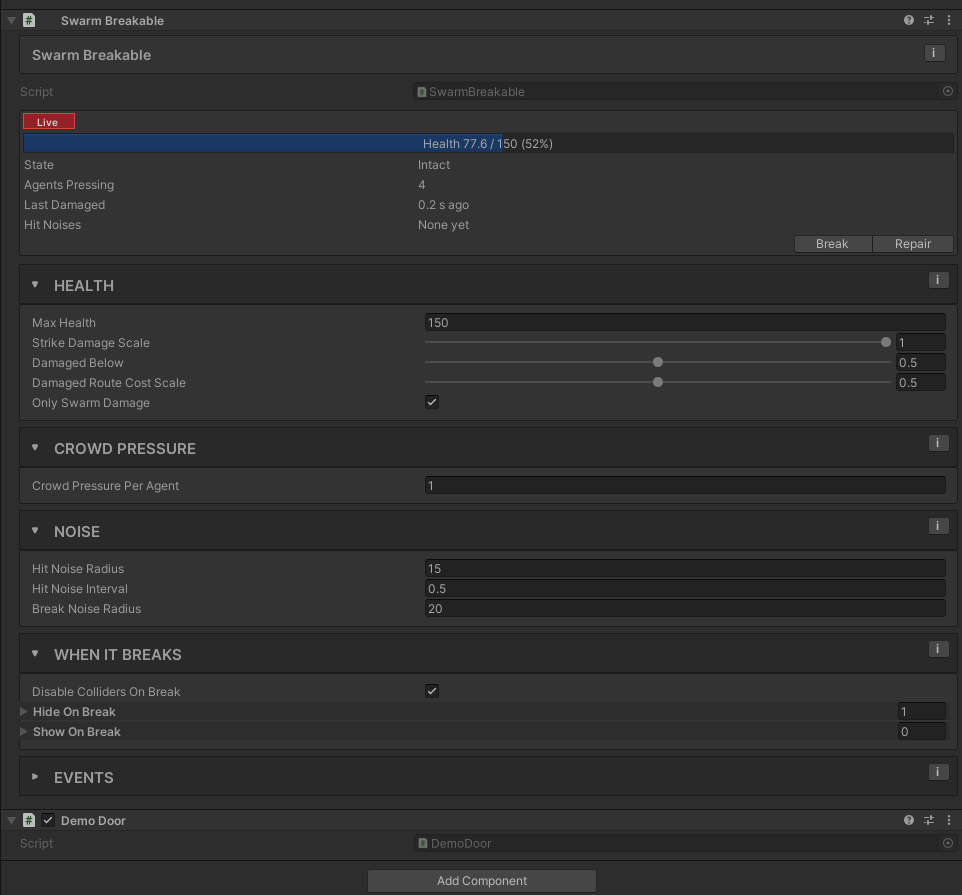
- Max Health: health at full. Every hit and every tick of crowd pressure comes off this.
- Strike Damage Scale: the share of each hit this object actually takes. 1 takes it in full; 0.5 halves it, for a reinforced door; 0 means hits do nothing and agents stop swinging at it altogether, pressing instead. Crowd pressure is not affected, and neither is damage your own code applies directly through
ApplyDamage. See Breakable Obstacles for how it combines with an attacker's Obstacle Damage Scale. - Damaged Below: the health fraction at or below which the object counts as Damaged rather than Intact. Crossing this line is what fires On State Changed and drops the route cost to Damaged Route Cost Scale, so this one field decides both the label and the moment the crowd notices the door giving way.
- Damaged Route Cost Scale: the share of Route Cost a crossing pays once Damaged. The default 0.5 halves it; 1 keeps the full cost until the object actually breaks. This changes once, at the state transition, never continuously.
- Crowd Pressure Per Agent: health per second each agent pressing it takes off, on top of the hits. An agent presses when this object closes its way to a target, a searched spot or a heard noise just ahead of it, so the agents bunched against the door count, not the whole crowd stacked up behind them. 0 turns crowd pressure off and leaves only hits.
- Hit Noise Radius, Hit Noise Interval, Break Noise Radius: how far a hit, and a break, are heard by agents with no target of their own. Only agents whose archetype has a Perception Profile with Search on hear them, so in a scene with no Perception Profile these fields do nothing. See Breakable Obstacles for why a crowd drawn only by the noise eventually gives up.
- Only Swarm Damage: on, only a hit whose
SwarmDamageContext.Sourceis theSwarmManagercounts, which keeps the player's own weapons from breaking doors. Turn it off to let your own damage sources (see Combat Integration) break it too. - Disable Colliders On Break and Hide On Break: what switches off and disappears when health reaches zero. Disable Colliders On Break disables every non-trigger collider on the object and its children, except anything listed in Show On Break, so the player and shots pass through the opening without punching through whatever just appeared there. Hide On Break hides specific objects, typically the door leaf; leave it empty and react through On Broken instead. Those objects are switched on when the breakable starts and again at
Repair(). - Show On Break: objects switched on when it breaks: a door fallen flat, planks, rubble. They are switched off when the breakable starts, even if you left them active in the scene, and off again if you call
Repair(), so you can build the broken look in place and leave it visible while you edit. A shown object can carry its own Swarm Flow Modifier, which is how a break gets a gap with some texture instead of leaving open ground. See Breakable Obstacles. - On Damaged, On State Changed, On Broken, On Pressure Changed: UnityEvents for health fraction, state transitions, the break itself, and the number of agents currently pressing it.
Damaged,StateChanged,BrokenandPressureChangedare the matching C# events for scripting. On Damaged fires whenever health changes, not only when it drops: every hit and every tick of crowd pressure that took health off, and everyRepair(), which sends a fraction of 1. If it drives a hit sound or a shake, compare the fraction with the last one you received and react only when it went down. Break()breaks it immediately regardless of health.Repair()restores full health and the full route cost, and switches back on exactly what the break switched off, whatever a door script did in the meantime: a door left open when it broke stays open after repair.
Swarm Pushable
Lets the swarm shove a physics prop, such as a bin or a crate, instead of routing around it. It requires both a Rigidbody and a Swarm Flow Modifier on the same object, and it needs Surface Flow on like the rest of this page. Blocks Agents has to be on in that modifier: with it off agents walk through the box, nothing pushes the prop and it moves no one aside. The modifier's inspector warns about that and offers a Turn Blocks Agents On button.
This is also the component that makes a moving Rigidbody solid to the crowd. A Rigidbody with a collider and nothing else does not make agents give way. Physics & Colliders compares the setups, with measurements, and lists the steps.
- Force Per Agent: force, in newtons, each agent pressed against the object adds every physics step.
- Max Crowd Force: the ceiling on the summed force from every pressing agent in one step, so a packed crowd cannot launch the prop across the map.
The push is read each step through ConsumeCrowdPush, which SwarmPushable turns into a Rigidbody force. Only a modifier with a SwarmPushable records crowd push, so calling it on one without returns no contacts. For a different reaction, such as a gate that swings open under enough pressure rather than sliding away, read the modifier's PressingAgentCount or subscribe to a Swarm Breakable's PressureChanged event instead. A kinematic Rigidbody receives no force from a SwarmPushable.
The colliders under a Swarm Pushable are excluded from agent obstacle blocking and from agent grounding, the same way a SwarmTarget's colliders are. Agents feel the prop through its Swarm Flow Modifier box instead: they cannot step into its cells, and every step they are moved out of the box itself. Drive the prop with a force, not by setting its velocity, and give it a physics layer that still collides with your walls and floor.
In the sample DemoPlayerController, the player can shove the same Rigidbody (the Pushing fields), up to a maximum mass, since a CharacterController does not push physics objects on its own. Push Force caps that shove in newtons.
Recipes
| Recipe | Blocks Agents | Route | Breakable | Pushable |
|---|---|---|---|---|
| Player door | On | Extra Cost | Optional | No |
| Locked door (never opens for the player) | On | Extra Cost, high | Yes, high health | No |
| Barricade | On | Extra Cost | Yes, low health | No |
| Low fence or rail (never comes down) | On | Extra Cost, low | No | No |
| Boarded window | On | Extra Cost | Yes | No |
| Destructible wall that should also hide what's behind it | On | Extra Cost, high (not Blocked, see Hiding What's Behind It) | Yes, high health | No |
| Slow zone the crowd prefers to avoid but can still cross | Off | Extra Cost | No | No |
| Pushable prop | On | Free, like Zombie City's bins, so a crowd drives it ahead instead of walking round it. A small Extra Cost makes the crowd avoid it unless going round is longer | No | Yes |
A door your own script opens and closes can flip IsOpen rather than the component's enabled state. The route ends up the same, and the modifier stays registered. A Swarm Breakable switches the modifier off when it breaks and back on at Repair(), so a door script that also toggles enabled has to work around the breakable. IsOpen leaves enabled to it. See Breakable Obstacles for the pattern, including what to do about a crowd standing in the doorway when it's time to close.
Sizing the Box, Not the Level
This system is for cells that need to change at runtime without a rebake: a door, a barricade, a prop. A wall that never moves and never opens belongs in the Unwalkable Layer Mask at bake time instead. Registering hundreds of static walls as Swarm Flow Modifiers costs restamp and lookup overhead for the same result the bake already gives you for free.
Performance
What it costs
While any cell is closed, every agent gets a contact check against the cells next to it each step, so that part of the cost grows with the agent count, not with the number of doors. Moving, opening or damaging a modifier restamps the whole layer once. When that changes a route cost, each target's field rebakes once, at most every Surface Flow Rebake Interval (in Swarm Settings), and a Swarm Breakable only triggers that at a state change (Damaged, Broken), not on every hit.
The Demo's Doors
The sample DemoDoor component (Samples/Shared) shows the pattern end to end. It opens when a chosen layer, usually the player, walks into its trigger, swings the leaf open over a set time, and closes again once every opener has left and SwarmManager.IsAnyAgentInside reports the doorway clear. It flips the modifier's IsOpen and never touches enabled, so an open door costs the route nothing and stays registered, and the Swarm Breakable beside it is the only thing that switches the modifier off. Add a SwarmBreakable alongside it and a crowd that cannot reach the player any other way batters it down instead, with a small jolt animation on every hit. Once it breaks, the doorway stays open for good. The shipped door prefabs list the leaf under Hide On Break, so the leaf disappears rather than staying swung open.
Zombie City's four door prefabs (single, double, and the exterior-framed versions of both) use this combination, and its trash bins use a SwarmFlowModifier plus SwarmPushable with no breakable at all, so the crowd shoves them aside rather than fighting them. A door leaf sits on Obstacle, so the player's shots stop at a closed door.
The sample DemoBarricade component is the look of a barricade: its planks come off one at a time as the Swarm Breakable loses health, and it shakes on every hit. Zombie City puts three across the alleys through the street facades. Their collider sits on Low Obstacle, like the fences, so it stops the player while shots pass between the planks at whatever is battering it.
Related
- Breakable Obstacles: how pressing, striking, crowd pressure and noise decide what happens to one of these over time.
- Navigation: baking the Surface Flow Field these components modify at runtime.
- Sight: Occlusion and Awareness: Forget Time: how a closed door reads to perception, and how long an obstacle holds an attacker's attention.
- Combat Integration: the
IDamageableandSwarmDamageContextcontracts a Swarm Breakable implements. - Attack Profile: the reach and damage an attacking agent brings to a blocked obstacle.