Tiled (TMX)
Super Tilemap Editor can import maps made in the Tiled map editor. This page covers how to save the map so the importer can read it, how to build a tileset from it, and what the import creates in your scene.
Concept
The import has two steps. First you create a tileset from the .tmx file, which packs the images of every Tiled tileset the map uses into one atlas. Then you import the map with that tileset, which creates a tilemap group with one tilemap per Tiled tile layer.
It is a one-way import. Changing the .tmx file later does not update anything in Unity, so you import again to pick up changes.
The sample in Assets/CreativeSpore/SuperTilemapEditor - Extra/Tileset - Samples/Tiled - Tmx Import holds a map, desert.tmx, the tileset made from it, desertTileset.asset, and the scene with the imported result, desert.unity.
How to use it
Prepare the map in Tiled
The importer reads tile layers stored as XML, where every cell is written as its own <tile gid="..."/> element. It does not read CSV or Base64 layer data, compressed or not.
- Open the map in Tiled.
- Open
Map > Map Properties. - Set
Tile Layer FormattoXML. - Save the map.
Keep the map finite. An infinite map stores its layers in chunks, which the importer does not read.
Tilesets can be embedded in the map or saved as separate .tsx files. The importer resolves every path from the folder of the .tmx file, including image paths written inside a .tsx file. Keep separate tileset files in the same folder as the map so their image paths still work.
Create a tileset from the map
- In the Project window, select the folder where the tileset should go.
- Choose
Assets > Create > SuperTilemapEditor > Tiled > Tileset (from TMX File). - Pick the
.tmxfile in the file dialog. It can be anywhere on disk.
The importer creates two assets in the selected folder, named after the map:
<map>Tileset.asset, the tileset,<map>Atlas.png, the atlas with the images of all the map's tilesets packed together.
The tileset gets one tile view per Tiled tileset, so you can still browse each set on its own in the Tile Palette.
The tile order in the new tileset follows Tiled's tile ids. That is what lets the next step find the right tile for every cell.
Import the map into the scene
- Select the tileset you created from the map.
- In its inspector, press
Import TMX into the Scene. The button appears once the tileset has an atlas. - Pick the
.tmxfile.
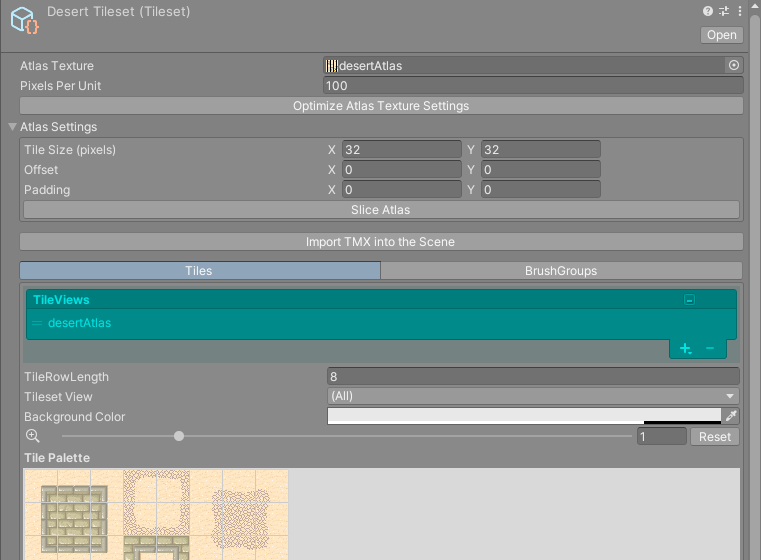
Use the tileset made from the same map, or from a map that uses the same Tiled tilesets in the same order. Cells are matched to tiles by position in that order, so a different tileset gives you the wrong tiles.
What gets created
In the open scene, at the world origin:
- a GameObject named after the
.tmxfile, with aTilemapGroupcomponent, - under it, one child per Tiled tile layer, named after the layer, with an
STETilemapthat uses the tileset.
Each tilemap also takes these settings from Tiled:
| Tiled | Super Tilemap Editor |
|---|---|
| Layer order | Order In Layer, 0 for the first layer and one more for each layer after it, so later layers draw on top as they do in Tiled. |
| Layer visibility | Visible on the tilemap. |
| Layer opacity | The alpha of Tint Color. |
| Flip horizontal, flip vertical and the diagonal flip of each tile | The cell's flip and rotation flags. Every orientation Tiled can produce comes through. |
The tile size is the tileset's tile size divided by its Pixels Per Unit. A new tileset has Pixels Per Unit at 100, so a 32 pixel tile is 0.32 units wide. To import at another scale, change Pixels Per Unit in the tileset before you press Import TMX into the Scene.
Limitations
The importer brings in tile layers and tile images only, so plan a map for import around these limits:
- Object layers, image layers and group layers are skipped. A tile layer inside a group layer is skipped with its group.
- Tile properties, terrains, Wang sets and tile animations defined in Tiled are not imported. Rebuild animations as an AnimBrush and autotiling as one of the other brushes.
- The map is placed as an orthogonal grid. Isometric and hexagonal maps are not converted.
- Layer offsets and parallax factors are ignored. Every layer starts at the group's origin.
- The tileset takes its tile size from the first tileset in the map, and every cell of the tilemap has that size. Keep all the tilesets of a map at the same tile size.
- The atlas is at most 8192 by 8192 pixels, so the images of all the map's tilesets must fit in that together.
- The importer reads tilesets made from a single image, with margin and spacing, and tilesets made from a collection of separate images. In a collection, ids that were removed in Tiled become empty tiles, so the ids of the other tiles still match.