Sample Scenes
The asset ships four demo scenes in the SuperTilemapEditor - Extra folder. Each one is a finished map you can open, select and paint on, so they are a quick way to see a feature working before you set it up yourself.
Where they are
All paths are under Assets/CreativeSpore/SuperTilemapEditor - Extra/.
| Scene | Path | Shows |
|---|---|---|
| Pixel Platform | Tileset - Samples/Kenneys - Pixel Platform/PixelPlatformDemo.unity |
Layers, parallax, 2D colliders, animated and random brushes, tile prefabs |
| Rogue Like | Tileset - Samples/Kenneys - Rogue Like/RoguelikeDemo.unity |
Autotiling brushes, a map generated from code, 3D colliders, pathfinding |
| Tiled import | Tileset - Samples/Tiled - Tmx Import/desert.unity |
A map imported from a Tiled .tmx file |
| Pyxel Edit import | Importers/Pyxel Edit/Extra - PyxelEdit/PyxelEdit - Demo Scene.unity |
A map imported from a Pyxel Edit export |
The art in the two Kenneys folders comes from Kenney's free asset packs. The desert art has its own license.txt in its folder.
Pixel Platform
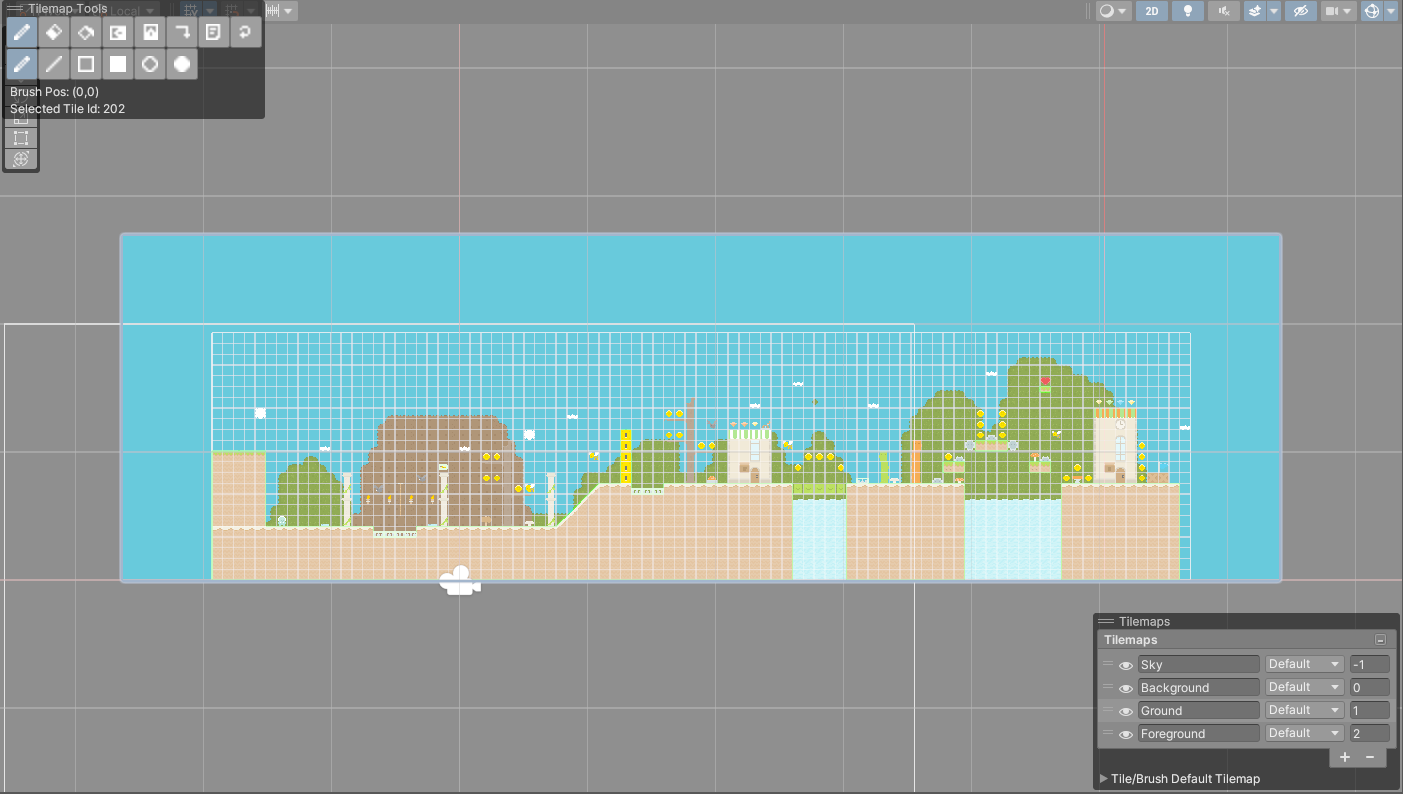
A side view platformer level built as a tilemap group called Tilemaps with four layers:
Backgroundhas aParallax Factorof 0.8, so it scrolls slower than the rest when the camera moves. See Renderer.Skysits behind everything, withOrder In Layerset to -1.Groundis the only layer with colliders. ItsCollider Type:is2D, using edge colliders. See Colliders.Foregrounddraws in front of the ground.
Select Tilemaps and the Tilemaps overlay lists the four layers in the scene view. Press the keypad + and - keys to step through them.
The tileset, PixelPlatformTileset, carries most of the brush types you would use in a platformer. The Brushes folder holds animated brushes for coins, torches, bats, bees and slimes, and two random brushes. Two tiles in the tileset have prefabs attached: Key and Spikes. Painting one of those tiles spawns the prefab in its cell. See Tile Prefabs and Built-in Brushes.
Rogue Like
A top down map on a tilemap group called Tilemaps with two layers, Ground and Ground Overlay. Ground has Collider Type: set to 3D.
The Brushes folder is where to look for autotiling. It has eleven carpet brushes, three road brushes, eight random brushes and an animated brush. Paint with a carpet brush over an area and watch the edges and inner corners pick themselves. See Built-in Brushes.
The Tilemaps object also carries a RogueLikeMapGenerator component. Click Generate Map in its inspector to fill a 180 by 180 map from Perlin noise: water, grass, flowers and mountains, mostly painted through brushes by brush id. In Play mode the same button appears in the top left corner of the Game view. The source, RogueLikeMapGenerator.cs, is a short example of writing tiles from code with SetTileData and then calling UpdateMesh. See Tile Data.
The PathfindingBehaviour object shows the A* pathfinding. Enter Play mode and click anywhere on the map. The object computes a path around the tiles that have colliders and walks it. Turn on Gizmos in the Game view to see the path it chose. See Pathfinding.
Tiled import
The result of importing desert.tmx, a sample map from the Tiled editor. The folder keeps the source files next to what the importer made from them:
desert.tmxanddesert.tsxare the Tiled map and tileset.desertTileset.assetanddesertAtlas.pngwere created from the.tmxfile withAssets > Create > SuperTilemapEditor > Tiled > Tileset (from TMX File).- The scene holds the tilemap group
desertwith one tilemap,Ground, created with the tileset'sImport TMX into the Scenebutton.
To repeat the import yourself, follow Tiled (TMX) with these files.
Pyxel Edit import
The result of importing a Pyxel Edit export. The folder holds the exported JJ.Menu-background.json and JJ.Menu-background.png, and the tileset made from them.
The scene has a tilemap group Level with one tilemap, Layer 0. The PyxelEdit component on Level holds the settings the import used, with the JSON file in Tilemap JSON. Its Generate PyxelEdit Tilemap button runs the import again. See Pyxel Edit.