Atlas Editor
The Atlas Editor rebuilds an atlas texture with space between the tiles and, optionally, the edge pixels of each tile copied out into that space. This page explains why that removes seams and how to use the window.
Concept
Why tiles show seams
A tilemap draws each tile by sampling a rectangle of the atlas. When the rectangles of two tiles touch, a sample that lands a fraction of a pixel outside a tile reads the tile next door. On screen that is a thin line of the wrong color along the tile edges, usually flickering as the camera moves. Texture filtering, mipmaps and a camera at a non whole pixel position all make stray samples more likely.
Two changes to the atlas fix it:
- Padding puts empty pixels between tiles, so a stray sample reads transparent space instead of another tile.
- Extrude fills that space with copies of each tile's own border pixels. A stray sample then reads the same color as the edge it missed, and the gap disappears too.
Padding alone can leave a faint transparent line, so use extrude as well when you can.
The other fix is the tilemap's Inner Padding, which pulls every tile's UVs a fraction of a pixel inwards so the sampler never reaches the border. It needs no new atlas, but it trims the outer edge of every tile slightly. The tilemap inspector suggests it when the tileset has no padding. See Renderer.
How to use it
- Open
SuperTilemapEditor > Window > Atlas Editor Window. - Drag your tileset into
Tileset (optional). TheSlice Settingsand the atlas texture fill in from it. - Leave
Slice Settingsas they are if the tileset is already sliced correctly. - Under
New Settings, setPadding (pixels)andExtrude (pixels). - Press
Previewto check the result. - Press
Apply Settings, and answerYestoKeep previous tile properties?.
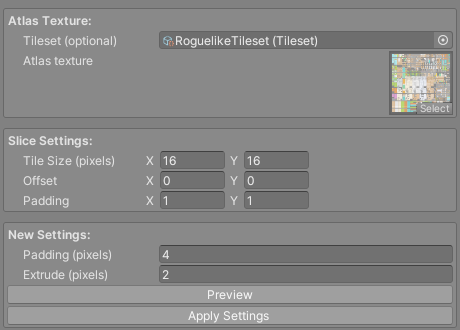
Apply Settings writes the new atlas over the old texture file, re-slices the tileset with an Offset equal to the extrude and a Padding equal to the new padding, and refreshes every active tilemap in the open scenes that uses the tileset.
Tile ids do not change. The new atlas places the tiles in id order, and re-slicing reads them back in the same order, so painted maps, brushes and tile views keep working. The number of columns comes from the palette's TileRowLength; see Tile Palette.
Warning
Apply Settings overwrites the atlas file on disk and cannot be undone. Commit it to version control or keep a copy first. The new texture is always written as PNG data, so use it on a .png atlas.
The new atlas is bigger than the old one. Select the tileset afterwards and press Optimize Atlas Texture Settings, so the texture's Max Size still fits it; see Tilesets.
Padding and extrude values
Padding (pixels) is never smaller than twice Extrude (pixels). The window raises it for you if you try, since a tile's extruded border and its neighbour's must both fit in the gap.
For pixel art with Point filtering, an extrude of 1 or 2 with the padding that goes with it is usually enough. Smoothed textures that use Bilinear filtering or mipmaps need more, because every mip level halves the gap.
The first tile starts Extrude pixels in from the top left corner of the new atlas. That is why the re-slice uses the extrude as its Offset.
Preview
Preview builds the atlas without saving anything. It shows below the settings and in an Atlas Preview window that outlines each tile in cyan. In that window the mouse wheel zooms and dragging scrolls. It closes when it loses focus.
Building the atlas turns on Read/Write in the source texture's import settings, because the window has to read its pixels. That happens on Preview too.
Using the window without a tileset
You can leave Tileset (optional) empty and drag a texture into Atlas texture instead. The Slice Settings then describe where the tiles are in that texture, and Apply Settings only rewrites the texture file. Slice your tileset afterwards with an Offset equal to the extrude and a Padding equal to the padding you chose.
With a tileset assigned, the Slice Settings fields edit the tileset's own Tile Size (pixels), Offset and Padding directly, which is why you normally leave them alone.
Reference
| Field | What it does |
|---|---|
Tileset (optional) |
The tileset whose atlas you are rebuilding. |
Atlas texture |
The texture to rebuild. Filled in from the tileset when one is set. |
Tile Size (pixels) |
Size of one tile in the current atlas. |
Offset |
Pixels before the first tile in the current atlas. |
Padding |
Pixels between tiles in the current atlas. |
Padding (pixels) |
Pixels between tiles in the new atlas. At least twice the extrude. |
Extrude (pixels) |
How many pixels of each tile's border are copied outwards into the padding. |
Preview |
Builds the new atlas and shows it without saving. |
Apply Settings |
Saves the new atlas over the old file and re-slices the tileset. |