Colliders
The Collider tab turns a tilemap's tiles into physics colliders, 2D or 3D, and lets you edit tile collider shapes directly in the Scene view.
Concept
Which tiles collide, and with what shape, is set per tile in the tileset: none, the full cell, or a polygon. Tile Properties covers that. The tilemap reads those shapes and builds colliders from them, one set per chunk, merging neighbouring tiles into larger outlines instead of one collider per tile.
The colliders are components on the hidden chunk GameObjects. They are rebuilt whenever you paint, so you never add or edit them by hand. To see them in the Hierarchy, turn on Show Tile Chunks in the Map tab.
How to use it
- Select the tilemap and open the
Collidertab. - Under
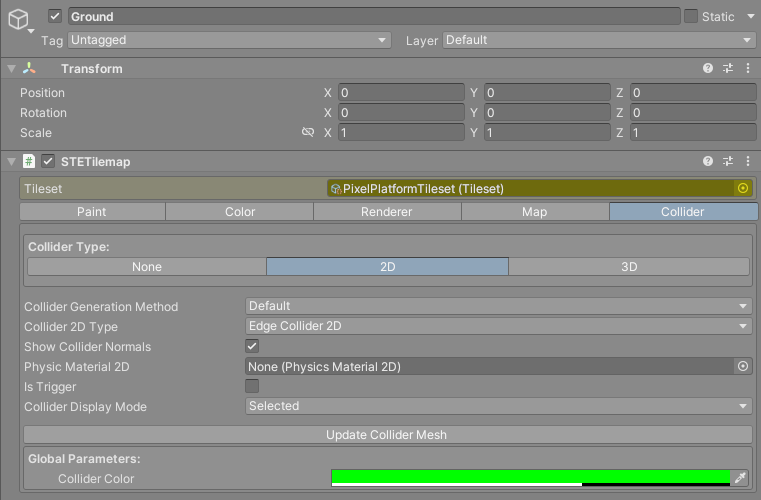
Collider Type:pick2Dor3D. A new tilemap starts atNone. - For 2D, choose the
Collider 2D Type. - Make sure the tiles that should be solid have a collider in the tileset.
The collider outlines are drawn in the Scene view in green while the tilemap is selected.
Reference
| Field | What it does |
|---|---|
Collider Type: |
None, 2D or 3D. |
Collider Generation Method |
How tile shapes are merged. Default or Clipper. Tooltip: Default: is faster, but less precise with PolygonCollider2D. In general, use Clipper only if Default is not working for PolygonCollider2D. |
Collider Depth |
3D only. How deep the collider walls are along the tilemap's Z axis, centered on the tilemap's plane. |
Physic Material |
3D only. The physics material given to every MeshCollider. |
Collider 2D Type |
2D only. EdgeCollider2D or PolygonCollider2D. See below. |
Show Collider Normals |
2D only. Draws a short line on each collider segment showing which way it faces. |
Physic Material 2D |
2D only. The physics material given to every 2D collider. |
Is Trigger |
Makes every collider a trigger. |
Collider Display Mode |
When the outlines are drawn in the Scene view: Selected (the tilemap is selected), ParentSelected (the tilemap or any of its parents is selected) or Always. The grid from the Map tab follows this setting too. |
Collider 2D Optimization Disabled |
Only shown for PolygonCollider2D. Gives each tile its own path instead of merging neighbours. |
Update Collider Mesh |
Rebuilds the colliders. |
Collider Color |
Under Global Parameters:. The color of the outlines, for every tilemap, saved on your machine. |
Changing any field in this tab rebuilds the colliders straight away. Update Collider Mesh is for when you changed tile collider shapes in the tileset and want to see the result without painting.
What each type builds
2D with EdgeCollider2D. Each chunk gets one EdgeCollider2D per outline. Edges shared by two solid tiles are removed, including across chunk borders, so a floor of tiles becomes one line along its top and sides.
2D with PolygonCollider2D. Each chunk gets one PolygonCollider2D holding every outline as a path. The shapes have an inside, so a point within a wall counts as inside the collider. Across a chunk border the two sides are treated as separate shapes, so you will see an outline along the border.
3D. Each chunk gets one MeshCollider. Its mesh is a strip of walls standing on the tile outlines, Collider Depth deep. With Is Trigger on, Unity requires a convex mesh collider, so each chunk's trigger becomes one convex hull around all of its shapes. That is rarely what you want.
Warnings in the tab
With Is Trigger on:
Activating IsTrigger could generate wrong collider lines if not used properly. Use Show Tilechunks in Map section to display the real collider lines.
With PolygonCollider2D:
Using Polygon colliders could generate wrong collider lines if not used properly. Use Show Tilechunks in Map section to display the real collider lines. If performance is not a problem, disable the Collider 2D optimizations to avoid this issue.
The checkbox that follows the second warning is Collider 2D Optimization Disabled. Turn it on if the merged polygon outlines come out wrong. It costs more physics shapes, one per solid tile.
Edge or polygon for a platformer
Start with EdgeCollider2D. Within a chunk it builds one continuous line along each run of floor or wall, so a character sliding along a row of tiles does not snag on the joins between individual tiles.
Its weakness is that an edge has no inside. A body that ends up inside a wall, from a fast fall or a spawn point placed in the ground, is not pushed out, and queries such as Physics2D.OverlapPoint inside a wall find nothing. Keep movement speeds sane or use continuous collision detection on fast bodies.
Switch to PolygonCollider2D when you need solid areas: overlap checks, triggers that detect being inside a region, or physics bodies that must be pushed out of walls. Watch the chunk borders, since the outlines split there.
Collisions covers how chunk colliders reach your scripts and how to find the tile you hit.
Editing tile colliders in the Scene view
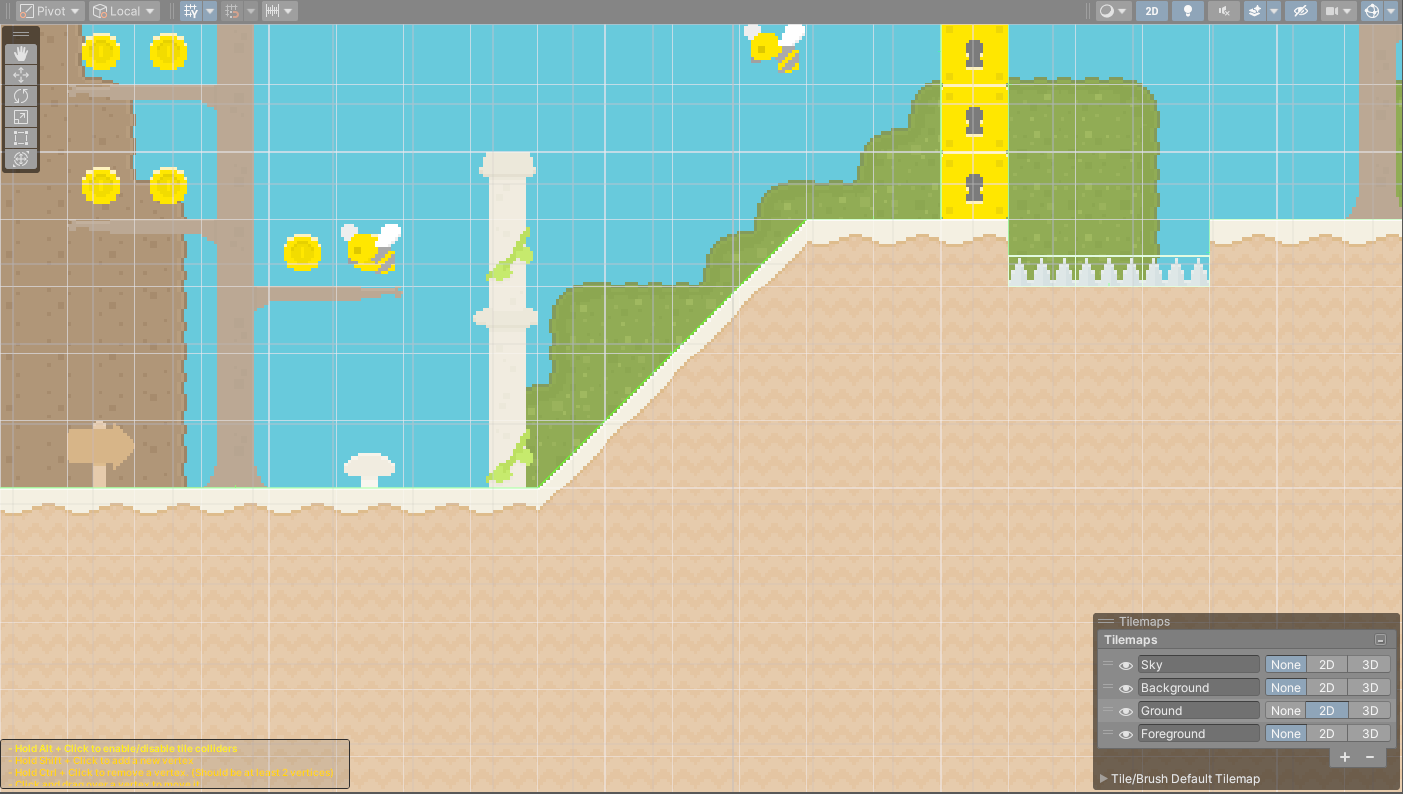
While the Collider tab is open, hovering over a tile in the Scene view shows that tile's collider shape with numbered vertices, and a help box in the lower left of the Scene view lists the controls:
| Action | How |
|---|---|
| Turn the tile's collider on or off | Hold Alt and click the dot in the middle of the tile. |
| Move a vertex | Drag it. Vertices snap to the pixels of the tile. |
| Add a vertex | Hold Shift and click on the outline. |
| Remove a vertex | Hold Ctrl and click it. A shape keeps at least two vertices. |
| Select the tile in the palette | Right click it. |
Warning
These edits change the tile in the tileset, not the cell. Every cell showing that tile, in every tilemap that uses the tileset, gets the new shape.
On macOS the keys are Option and Command. Editing a full tile collider turns it into a polygon, and a polygon dragged back to the four corners becomes a full collider again.
Known limitations
Brushes that assemble a cell from four subtiles, such as the Carpet brush, do not produce colliders that follow the subtile shapes. The cell collides with the collider of the single tile stored in it, so a corner drawn round can still collide as a square.